前言 最近在重拾Java网络编程,想要了解一些JAVA语言基本的实现,这里记录一下学习的过程。
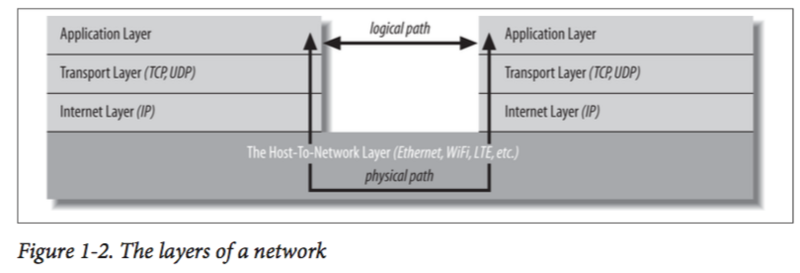
阅读之前,你需要知道 网络节点(node):位于网络上的互相连通的设备,通常为计算机,也可以是打印机,网桥,路由器等等烧入网卡,从而确保没有任何两台设备的MAC地址是相同的。IP地址:网络地址,由ISP供应商决定。包交换网络(packet-switched network):数据被拆解为多个包并分别在线路上传输,每个包包含发送者和接收者的信息。协议:节点之间进行交流所遵循的规定网络分层模型:
当我们试图访问一个网站时,浏览器实际上直接访问的是本地的传输层(Transport Layer)。传输层将HTTP报文分段为TCP报文并继续向下传递给IP层。IP层封装信息并且将其传送到物理链路上。服务器对收到的数据以相反的顺序解包并读取里面的请求内容。
端口:一台计算机在传输层的每一个协议上通常有65,535个逻辑端口。HTTP通常使用80端口C/S模型:客户端与服务器模型。通常是客户端向服务器主动发送请求并等待服务器的响应。
基于流的JAVA Socket 通信 Java的IO最初是基于流的。从输入流中读取数据,向输出流中写入数据。不同类型的流入java.io.FileInputStream,sun.net.TelnetOutput Stream往往对应于不同类型的流数据。但是,读取和写入流的方法本质上是相同的。Java还提供了Readers和Writers系列来支持对字符流的输入输出。
流是同步的。同步的流是指当程序(通常是某个线程)要求从流中读取或是向流中写入一段数据时,在获取到数据或是完成数据写入之前,该程序将会一直停在这一步,不会进行任何工作。Java也提供了非阻塞的I/O。我们将在后面继续了解。
OutputStream 先看一下所有输出流的父类OutputStream的API
1
2
3
4
5
6
7
8
9
10
11
12
public abstract class OutputStream { public abstract void write (int b) ; public void write (byte [] data) throws IOException; public void write (byte [] data, int offset, int length) throws IOException; public void flush () throws IOException; public void close () throws IOException; }
在这里write(int)是核心方法,它会将一个个ASCII码写入输出流中。但是,每写一个字节就传送的浪费是巨大的,因为一次TCP/UDP传输需要携带额外的控制信息和路由信息。所以通常会将字节缓存到一定数量后再发送。
使用完输出流后,及时的关闭它是一个很好的习惯,否则可能会造成资源的浪费或是内存泄漏。我们通常使用finally块来实现:
1
2
3
4
5
6
7
8
9
10
11
12
13
14
OutputStream os = null ;try { os = new FileOutputStream ("/tmp/data.txt" ); }catch (IOException e){ System.err.println(ex.getMessage()); }finally { if (os!=null ){ try { os.close(); }catch (IOException e){ } } }
上面的代码风格被称为dispose pattern,在使用需要回收资源的类时都会使用这个模式。Java7 以后我们可以用另一种更加简洁的方式来实现这个代码:
1
2
3
4
5
try (OutputStream os = new FileOutputStream ("/tmp/data.txt" )){ ... }catch (IOException e){ System.err.println(ex.getMessage()); }
Java会自动调用实现AutoCloseable对象的close()方法,因此我们无需再写ugly的finally块。
同样,看一下输入流的基类InputStream的API
1
2
3
4
5
6
7
8
9
10
11
public abstract class InputStream { public abstract int read () throws IOException; public int read (byte [] input) throws IOException; public int read (byte [] input, int offset, int length) throws IOException; public long skip (long n) throws IOException; public int available () throws IOException; public void close () throws IOException; }
输入流也是阻塞式的,它在读取到字节之前会等待,因此其后的代码将不会执行知道读取结束。
read()方法返回的应该是一个byte,但是它却返回了int类型,从而导致其返回值变为-128~127之间而不是0~255。我们需要通过一定的转化来获取正确的byte类型:
1
2
3
4
5
6
byte [] input = new byte [10 ];for (int i = 0 ; i < input.length; i++) { int b = in.read(); if (b == -1 ) break ; input[i] = (byte ) (b>=0 ? b : b+256 ); }
有时候我们无法在一次读取中获得所有的输入,所以最好将读取放在一个循环中,在读取完成之后再跳出循环。
1
2
3
4
5
6
7
8
9
int bytesToRead = 1024 ;int bytesRead = 0 ;byte [] buffer = new byte [bytesToRead];while (bytesRead < bytesToRead){ int tmp = inputStream.read(buffer, bytesRead, bytesToRead-bytesRead); if (tmp == -1 ) break ; bytesRead += tmp; }
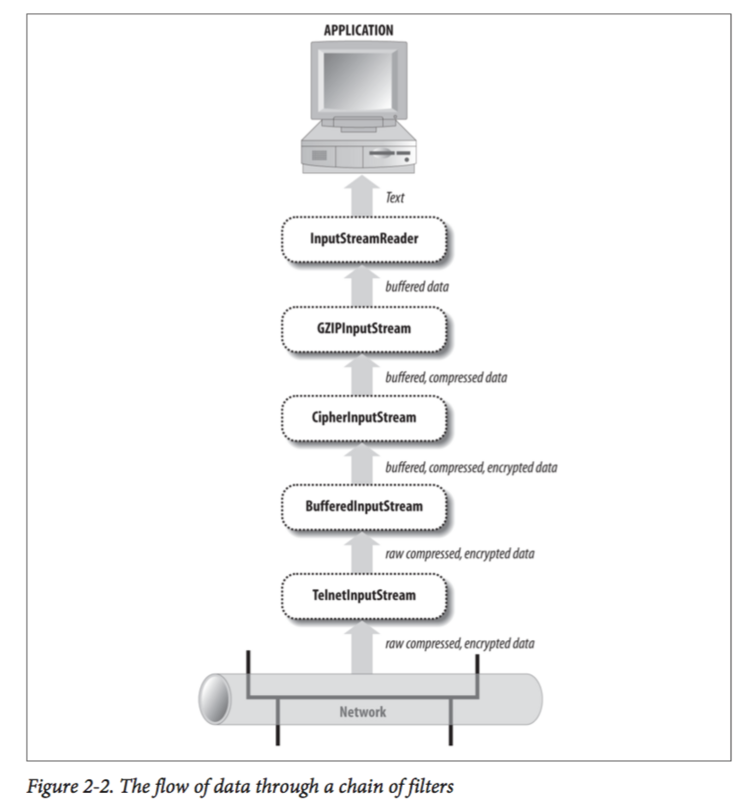
Filters Java IO采用了装饰者模式,我们可以将一个又一个装饰器加到当前流上,赋予该流新的解析。
在这里,先通过TelnetInputStream从网络上获取Telnet数据流,然后再逐个经过多个过滤器从而获得流中的数据。将过滤器相连的方法很简单:
1 FileInputStream fin = new FileInputStream ("data.txt" ); BufferedInputStream bin = new BufferedInputStream (fin);
Buffered Stream
构造器如下:
1
2
3
4
public BufferedInputStream (InputStream in) ;public BufferedInputStream (InputStream in, int bufferSize) ;public BufferedOutputStream (OutputStream out) ;public BufferedOutputStream (OutputStream out, int bufferSize) ;
PrintStream System.out就是一个PrintStream。默认情况下,我们需要强制flush将PrintStream中的内容写出。但是,如果我们在构造函数中将自动flush设置为true,则每次写入一个byte数组或是写入换行符或是调用println操作都会flush该流。
1
2
public PrintStream(OutputStream out) public PrintStream(OutputStream out, boolean autoFlush)
但是,在网络环境中应当尽可能不使用PrintStream,因为在不同的操作系统上,println的行为不同(因为换行符的标记不同)。因此同样的数据在不同的操作系统上可能不一致。
除此以外,PrintStream依赖于平台的默认编码。但是,这个编码和服务器端期待的编码格式很可能是不一样的。PrintStream不提供改变编码的接口。
而且,PrintStream会吞掉所有的异常。我们无法对异常进行相应的编码。
Date Stream
DataOutputStream的API:
1
2
3
4
5
6
7
8
9
10
11
12
13
14
15
16
17
18
19
public final void writeBoolean (boolean b) throws IOException public final void writeByte (int b) throws IOException public final void writeShort (int s) throws IOException public final void writeChar (int c) throws IOException public final void writeInt (int i) throws IOExceptionpublic final void writeLong (long l) throws IOException public final void writeFloat (float f) throws IOException public final void writeDouble (double d) throws IOException public final void writeChars (String s) throws IOException public final void writeBytes (String s) throws IOException public final void writeUTF (String s) throws IOException
DataInputStream的API:
1
2
3
4
5
6
7
8
9
10
11
12
13
14
15
16
17
18
19
20
21
22
23
24
25
public final boolean readBoolean () throws IOException public final byte readByte () throws IOException public final char readChar () throws IOException public final short readShort () throws IOException public final int readInt () throws IOExceptionpublic final long readLong () throws IOException public final float readFloat () throws IOException public final double readDouble () throws IOException public final String readUTF () throws IOExceptionpublic final int readUnsignedByte () throws IOException public final int readUnsignedShort () throws IOExceptionpublic final int read (byte [] input) throws IOException public final int read (byte [] input, int offset, int length) throws IOException我们可以使用Header中的content-length属性来读取相应长度的body public final void readFully (byte [] input) throws IOExceptionpublic final void readFully (byte [] input, int offset, int length) throws IOExceptionpublic final String readLine () throws IOException
这里需要强调一下为什么不要使用readLine()方法。因为readLine方法识别一行末尾的方法是通过\r或是\r\n。当readLine遇到\r时,它会判断下一个字符是不是\n。如果是,则将两个标记都抛弃并且将之前的内容作为一行返回。如果不是,则抛弃\r并将之前的内容返回。问题在于,如果流中最后一个字符为\r,那么读取一行的方法会挂起,并等待下一个字符。
这个问题在网络IO中特别明显,因为当一次数据发送结束之后,客户端在关闭连接之前会等待服务器端的响应。服务器端却在等待一个不存在的输入。因此二者陷入死锁。如果幸运的话,客户端会因为超时断开连接,使得死锁结束,同时你丢失了最后一行数据。也有可能这个程序无限死锁下去。
Readers Writers 文本中的字符并不能和ASCII码完全划等号。很多国家的语言如中文,日文,韩文等都远远超出了ASCII码编码的范围。用ASCII码是无法识别这些字节的。因此JAVA推出了Reader和Writer类。它将根据特定的编码来解读字节。
Writer类API
1
2
3
4
5
6
7
8
protected Writer () protected Writer (Object lock) public abstract void write (char [] text, int offset, int length) throws IOExceptionpublic void write (int c) throws IOExceptionpublic void write (char [] text) throws IOExceptionpublic void write (String s) throws IOExceptionpublic void write (String s, int offset, int length) throws IOException public abstract void flush () throws IOExceptionpublic abstract void close () throws IOException
这里和之前的区别在于将根据选择的编码转化为相应的byte。
OutputStreamWriter
1
2
public OutputStreamWriter (OutputStream out, String encoding) throws UnsupportedEncodingExceptionpublic void write (String s) throws IOException;
Reader类API
1
2
3
4
5
6
7
8
9
10
11
12
13
14
15
16
17
18
protected Reader () protected Reader (Object lock) public abstract int read (char [] text, int offset, int length) throws IOExceptionpublic int read () throws IOExceptionpublic int read (char [] text) throws IOException public long skip (long n) throws IOException public boolean ready () public boolean markSupported () public void mark (int readAheadLimit) throws IOException public void reset () throws IOExceptionpublic abstract void close () throws IOException
InputStreamReader
1
2
3
4
5
public InputStreamReader (InputStream in) public InputStreamReader (InputStream in, String encoding) throws UnsupportedEncodingException
使用InputStreamReader的范例:
1
2
3
4
5
6
7
public static String getMacCyrillicString (InputStream in) throws IOException { InputStreamReader r = new InputStreamReader (in, "MacCyrillic" ); StringBuilder sb = new StringBuilder (); int c; while ((c = r.read()) != -1 ) sb.append((char ) c); return sb.toString(); }
PrintWriter
1
2
3
4
5
6
7
8
9
10
11
12
13
14
15
16
17
18
19
20
21
22
23
24
25
26
27
28
29
30
31
public PrintWriter (Writer out) public PrintWriter (Writer out, boolean autoFlush) public PrintWriter (OutputStream out) public PrintWriter (OutputStream out, boolean autoFlush) public void flush () public void close () public boolean checkError () public void write (int c) public void write (char [] text, int offset, int length) public void write (char [] text) public void write (String s, int offset, int length) public void write (String s) public void print (boolean b) public void print (char c) public void print (int i) public void print (long l) public void print (float f) public void print (double d) public void print (char [] text) public void print (String s) public void print (Object o) public void println () public void println (boolean b) public void println (char c) public void println (int i) public void println (long l) public void println (float f) public void println (double d) public void println (char [] text) public void println (String s) public void println (Object o)
参考书籍
Java Network Prograing 4th edition