前言 这篇文章会帮助你使用Spring Boot Starter AOP实现AOP。我们会使用AspectJ实现四个不同的通知(advice),并且新建一个自定义的注解来追踪方法的执行时间。
你将会了解
什么是交叉分割关注点(cross-cutting concern)?
在应用中你如何实现交叉分割关注点?
AOP中的切面(Aspects)和切点(Pointcut)是什么?
有哪些不同类型的AOP通知(advice)?
如何使用Spring Boot实现AOP?
如何使用Spring AOP和AspectJ实现切面?
有哪些AOP最佳实践?
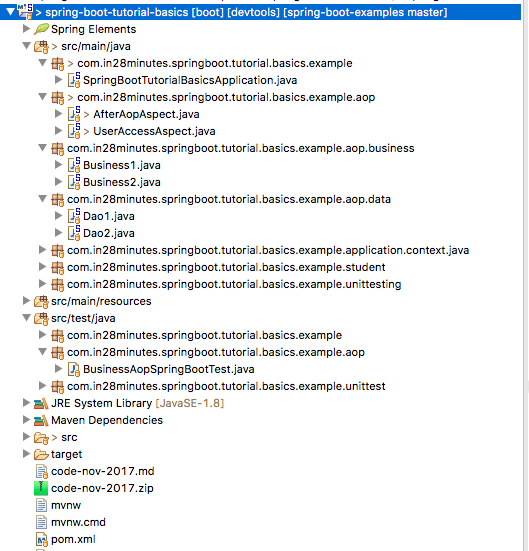
项目代码结构 下图是我们即将创建的项目结构的截图:
一些细节:
SpringBootTutorialBasicsApplication.java: 由Spring Initializer初始化生成的Spring Boot应用类。这个类是应用启动类。pom.xml: 创建项目所需的全部依赖。我们将会使用Spring Boot Starter AOP依赖。Business1.java, Business2.java, Dao1.java, Dao2.java: 业务类依赖于Dao类。我们会写切面来拦截对这些业务类和DAO类的调用。AfterAopAspect.java: 实现一些After通知。UserAccessAspect.java: 实现一个Before通知,用来做访问权限检查BusinessAopSpringBootTest.java:对业务方法进行单元测试Maven3.0+:编译工具Eclipse: 开发工具JDK1.8+
源码Github地址
介绍AOP 应用通常划分为多个层进行开发,一个经典的JAVA应用有:
网络层:用REST或是应用的形式将服务暴露给外部使用
业务层:业务逻辑
数据层:数据持久化逻辑
日志
安全
这些共通的切面成为交叉分割关注点(cross-cutting-concerns)
实现交叉分割关注点的一个方法是在每一个层分贝进行实现。但是,这样会使得代码难以维护。
面向切面编程为实现交叉分割关注点提供了一个解决方案:
将交叉分割切入点实现为一个切面
定义切点,说明这些切面在何时调用
初始化Spring Boot AOP项目 使用Spring Initializer新建一个Spring AOP项目非常的方法。
Spring Initializer 是创建Spring Boot项目的超级棒的工具。
备注:
启动Spring Initializer并且选择一下内容
选择com.in28minutes.springboot.tutorial.basics.example为Group
选择 spring-boot-tutorial-basics为Artifact
选择AOP依赖
点击Generate Project
将项目导入Eclipse
Spring Boot AOP starter Spring Boot AOP Starter的关键依赖有:
Spring AOP提供的基本的AOP功能
AspectJ提供的完整的AOP框架1 2 3 4 5 6 7 8 9 10 11 12 <dependency > <groupId > org.springframework</groupId > <artifactId > spring-aop</artifactId > <version > 5.0.1.RELEASE</version > <scope > compile</scope > </dependency > <dependency > <groupId > org.aspectj</groupId > <artifactId > aspectjweaver</artifactId > <version > 1.8.12</version > <scope > compile</scope > </dependency >
配置AOP 让我们添加一些业务逻辑类 - Business1和Business2。这些业务逻辑类依赖于一组数据类 - Data1和Data2。
1 2 3 4 5 6 7 8 9 10 11 @Service public class Business1 { private Logger logger = LoggerFactory.getLogger(this .getClass()); @Autowired private Dao1 dao1; public String calculateSomething () { String value = dao1.retrieveSomething(); logger.info("In Business - {}" , value); return value; } }
1 2 3 4 5 6 7 8 9 @Service public class Business2 { @Autowired private Dao2 dao2; public String calculateSomething () { return dao2.retrieveSomething(); } }
1 2 3 4 5 6 @Repository public class Dao1 { public String retrieveSomething () { return "Dao1" ; } }
1 2 3 4 5 6 @Repository public class Dao2 { public String retrieveSomething () { return "Dao2" ; } }
备注:
@Autowired private Dao1 dao1: DAO作为依赖注入业务类中public String calculateSomething(): 每个业务类包含一个简单的calculate方法
一个简单的AOP单元测试 让我们写一个简单的单元测试来调用刚刚创建的业务类:
1 2 3 4 5 6 7 8 9 10 11 12 13 14 @RunWith(SpringRunner.class) @SpringBootTest public class BusinessAopSpringBootTest { private Logger logger = LoggerFactory.getLogger(this .getClass()); @Autowired private Business1 business1; @Autowired private Business2 business2; @Test public void invokeAOPStuff () { logger.info(business1.calculateSomething()); logger.info(business2.calculateSomething()); } }
备注:
@RunWith(SpringRunner.class) @SpringBootTest public class BusinessAopSpringBootTest:: 我们将在单元测试用启动一个完整的Spring Boot应用@Autowired private Business1 business1和@Autowiredprivate Business2 business2: 将业务类注入启动测试的Spring上下文中@Test public void invokeAOPStuff(){...}: 调用业务层的方法
这时,我们没有实现任何的AOP逻辑,因此,测试的输出应该就是从DAO类和业务类中返回的简单的信息:
1 2 c.i.s.t.b.e.a.BusinessAopSpringBootTest : In Business - Dao1 c.i.s.t.b.e.a.BusinessAopSpringBootTest : Dao1
实现@Before通知 通常来讲,当我们使用AOP来实现安全时,我们会想要拦截对方法的调用并进行检查。这可以直接通过@Before通知实现。
下面给出了一种实现:
1 2 3 4 5 6 7 8 9 10 11 12 13 14 @Aspect @Configuration public class UserAccessAspect { private Logger logger = LoggerFactory.getLogger(this .getClass()); @Before("execution(* com.in28minutes.springboot.tutorial.basics.example.aop.data.*.*(..))") public void before (JoinPoint joinPoint) { logger.info(" Check for user access " ); logger.info(" Allowed execution for {}" , joinPoint); } }
备注:
@Aspect: 说明这是一个切面@Configuration: 说明这是一个对切面的Spring Bean配置@Before: 我们想要在方法执行前执行切面("execution(* com.in28minutes.springboot.tutorial.basics.example.aop.data.*.*(..))": 定义了切点。我们想要拦截com.in28minutes.springboot.tutorial.basics.example.aop.data包中的所有方法。
当我们运行单元测试时,你会看见,在执行DAO方法之前,会执行用户权限检查:
1 2 3 4 5 6 7 Check for user access Allowed execution for execution(String com.in28minutes.springboot.tutorial.basics.example.aop.data.Dao1.retrieveSomething()) c.i.s.t.b.e.a.BusinessAopSpringBootTest : In Business - Dao1 c.i.s.t.b.e.a.BusinessAopSpringBootTest : Dao1 Check for user access Allowed execution for execution(String com.in28minutes.springboot.tutorial.basics.example.aop.data.Dao2.retrieveSomething()) c.i.s.t.b.e.a.BusinessAopSpringBootTest : Dao2
理解AOP术语: Pointcut, Advice, Aspect,Join Point 让我们花点时间来了解一下AOP术语:
切点(Pointcut):该表达式用来定义何时方法应当被拦截。在上例中,切点为execution(* com.in28minutes.springboot.tutorial.basics. example.aop.data.*.*(..))。
通知(Advice):你想要做什么?一个通知是你在拦截方法时想要调用的逻辑。在上例中,通知为before(JoinPoint joinPoint)方法中的代码。
切面(Aspect):定义何时拦截一个方法(Pointcut)以及做什么(Advice)和在一起成为切面
连接点(Join Point):当代码开始执行,并且切点的条件满足时,通知被调用。连接点是一个通知运行的特定实例。
织如(Weaver):实现AOP的框架 - AspectJ或Spring AOP
使用@After, @AfterReturning和@AfterThrowing通知 让我们现在来看看AOP提供的别的拦截选项:
@After: 在两种场景下执行 - 当一个方法成功执行或是抛出异常@AfterReturning: 只有在方法成功执行后运行@AfterThrowing: 只有在方法抛出异常后运行
让我们创建一个包含这些元素的简单的切面:
1 2 3 4 5 6 7 8 9 10 11 12 13 14 @Aspect @Configuration public class AfterAopAspect { private Logger logger = LoggerFactory.getLogger(this .getClass()); @AfterReturning(value = "execution(* com.in28minutes.springboot.tutorial.basics.example.aop.business.*.*(..))", returning = "result") public void afterReturning (JoinPoint joinPoint, Object result) { logger.info("{} returned with value {}" , joinPoint, result); } @After(value = "execution(* com.in28minutes.springboot.tutorial.basics.example.aop.business.*.*(..))") public void after (JoinPoint joinPoint) { logger.info("after execution of {}" , joinPoint); } }
执行后运行结果如下所示:
1 2 3 4 5 6 7 8 9 10 11 Check for user access Allowed execution for execution(String com.in28minutes.springboot.tutorial.basics.example.aop.data.Dao1.retrieveSomething()) In Business - Dao1 after execution of execution(String com.in28minutes.springboot.tutorial.basics.example.aop.business.Business1.calculateSomething()) execution(String com.in28minutes.springboot.tutorial.basics.example.aop.business.Business1.calculateSomething()) returned with value Dao1 c.i.s.t.b.e.a.BusinessAopSpringBootTest : Dao1 Check for user access Allowed execution for execution(String com.in28minutes.springboot.tutorial.basics.example.aop.data.Dao2.retrieveSomething()) after execution of execution(String com.in28minutes.springboot.tutorial.basics.example.aop.business.Business2.calculateSomething()) execution(String com.in28minutes.springboot.tutorial.basics.example.aop.business.Business2.calculateSomething()) returned with value Dao2 c.i.s.t.b.e.a.BusinessAopSpringBootTest : Dao2
可以看到,就在将值返回给调用的业务逻辑之前,after通知被执行了。
其它AOP功能:@Around和注解 能够使用AOP实现的功能之一是通过自定义注释来解析方法调用。
下面的例子展示了一个简单的TrackTiem注释:
1 2 3 @Target(ElementType.METHOD) @Retention(RetentionPolicy.RUNTIME) public @interface TrackTime {
我们可以添加一个切面来定义当添加TrackTime注解以后执行的逻辑。MethodExecutionCalculationAspect实现了一个简单的时间追踪功能。
1 2 3 4 5 6 7 8 9 10 11 12 @Aspect @Configuration public class MethodExecutionCalculationAspect { private Logger logger = LoggerFactory.getLogger(this .getClass()); @Around("@annotation(com.in28minutes.springboot.tutorial.basics.example.aop.TrackTime)") public void around (ProceedingJoinPoint joinPoint) throws Throwable { long startTime = System.currentTimeMillis(); joinPoint.proceed(); long timeTaken = System.currentTimeMillis() - startTime; logger.info("Time Taken by {} is {}" , joinPoint, timeTaken); } }
备注:
@Around: 是一个环绕型通知。它拦截方法调用后使用joinPoint.proceed()来执行方法@annotation(com.in28minutes.springboot.tutorial.basics.example.aop.TrackTime): 基于注解进行拦截的切点 - @annotation紧跟着完整的注解的名称
定义了注解和通知之后,我们可以将注解运用到想要跟踪的方法上,如下所示:
1 2 3 4 @Service public class Business1 { @TrackTime public String calculateSomething () {
AOP最贱实践 AOP最佳实践之一是将所有的切点定义在一个类中。这样有利于在一个地方维护所有的切点。
1 2 3 4 5 6 public class CommonJoinPointConfig { @Pointcut("execution(* com.in28minutes.spring.aop.springaop.data.*.*(..))") public void dataLayerExecution () {} @Pointcut("execution(* com.in28minutes.spring.aop.springaop.business.*.*(..))") public void businessLayerExecution () {} }
在定义其它切面的切入点时,可以这样调用上面的定义:
1 @Around("com.in28minutes.spring.aop.springaop.aspect.CommonJoinPointConfig.businessLayerExecution()")
完整的代码请前往GITHUB 浏览
原文链接: https://dzone.com/articles/implementing-aop-with-spring-boot-and-aspectj#